Keyword: link preview API · Updated October 12, 2026
Link Preview API: Build Rich Website Thumbnails for Any URL
Paste a link into Slack, Notion or Linear and it becomes a card with a title, a short description, a favicon and an image. Users expect the same in every product that accepts URLs. This guide shows how to build that with a link preview API that renders the page in a real browser, reads its metadata, and falls back to a screenshot when the site has no usable og:image. All of it comes from one SnapshotFlow request.
What is a link preview API?
This is different from generating Open Graph images for your own pages, which we cover in dynamic OG image generation. Here the URLs belong to someone else. You do not control their markup, their JavaScript or their image choices, so the preview service has to cope with whatever it finds.
Why simple link previews break
The classic implementation fetches the HTML, parses <meta property="og:*"> tags from the Open Graph protocol, and shows whatever it finds. That works for large publishers and fails in four common cases:
- No og:image at all. Documentation sites, internal tools, small business pages and many SaaS app routes ship without one. The card ends up as a grey box.
- Metadata set by JavaScript. Single-page apps often write the title and meta tags after the bundle runs. A plain HTTP fetch sees the empty shell.
- A generic or stale image. Every page of a site may share the same logo as og:image, so twenty different links look identical in a list.
- Bot blocks and consent walls. Some sites return a challenge page or a cookie wall to non-browser clients, and the parser reads that instead of the content.
A screenshot fixes the image problem in every case: it shows what the page actually looks like. Rendering in a real browser fixes the JavaScript problem. You get both from the same render if the API returns metadata alongside the image.
Link preview approaches compared
| Approach | JS-rendered metadata | Image when og:image is missing | What you operate |
|---|---|---|---|
| Fetch HTML and parse tags | No | None | A parser; fast and cheap |
| oEmbed endpoints | Provider-defined | Provider thumbnail | Per-provider integrations (YouTube, Vimeo and similar) |
| Self-hosted headless Chrome | Yes | Screenshot | Browsers, queues, memory limits, timeouts |
| SnapshotFlow screenshot + metadata | Yes | Screenshot from the same request | One HTTPS call and your own cache |
A practical setup combines them. Use oEmbed for the handful of video and media providers that publish it, and send every other URL through the rendered path. If you are deciding between running Chrome yourself and an API, the Puppeteer alternative breakdown compares the operational cost.
One request returns the thumbnail and the metadata
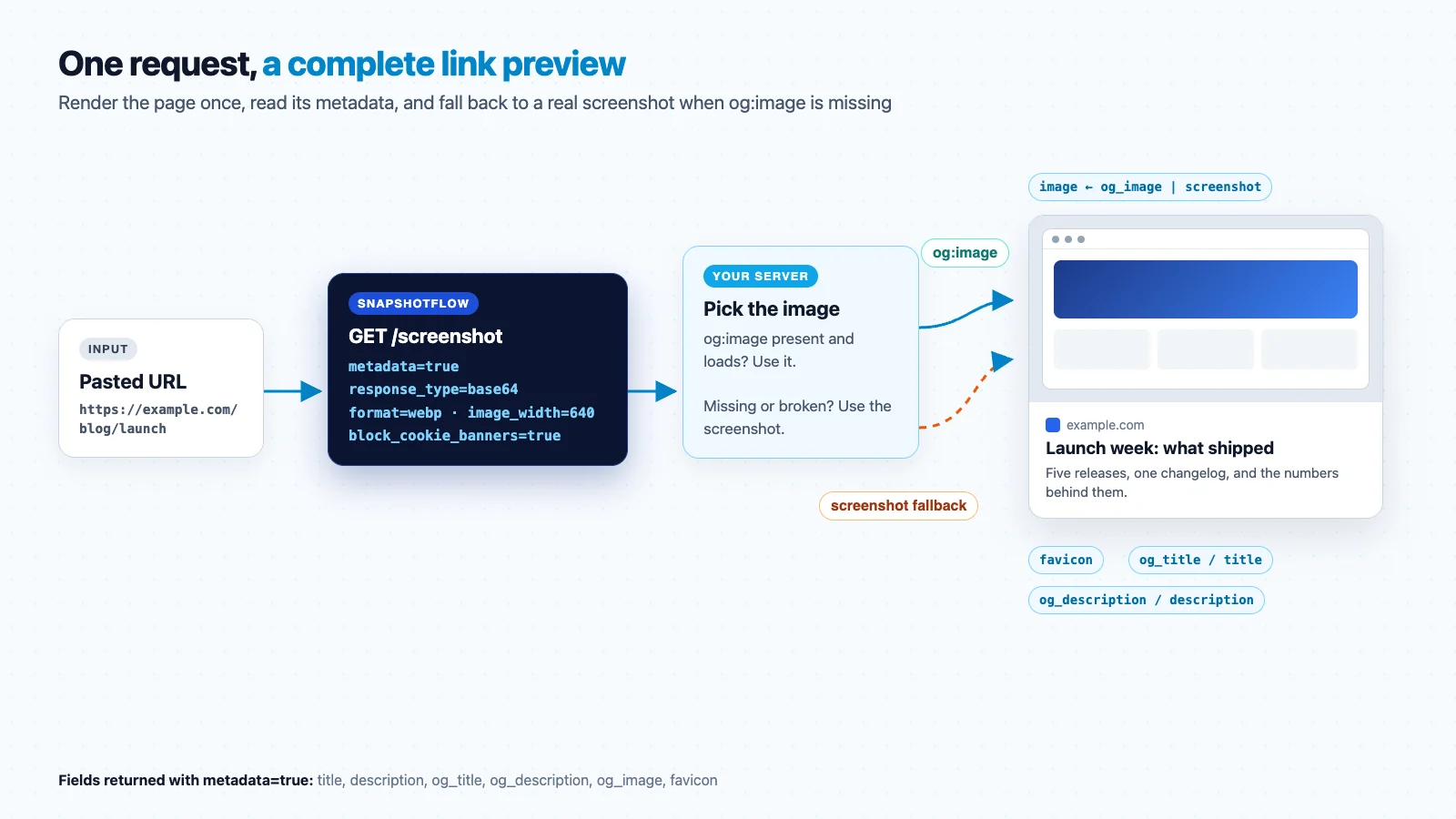
Add metadata=true to a screenshot request and use response_type=base64 to receive JSON instead of raw image bytes:
The response contains the thumbnail as a data URL plus the fields a preview card needs:
Metadata is read after JavaScript runs, so single-page apps return their real titles. image_width=640 resizes the capture while keeping its aspect ratio, which gives you a 640×400 thumbnail from a 1280×800 viewport. The page is rendered at desktop width, so the layout looks like what a visitor sees, but the file stays small.
Build the preview service in Node.js
The function below validates the URL, makes one SnapshotFlow request, picks the image, stores it in your own bucket and returns a preview object. The store interface is whatever you already use: S3, R2, GCS or a local disk in development.
The og:image download needs its own guard, because that URL comes from a page you do not control and your server is the one fetching it:
Some products prefer the screenshot even when og:image exists, for example a bookmarking app where every card should look like the page itself rather than a marketing banner. In that case skip step 1 and you never fetch third-party images at all.
Render the preview card
Keep the markup simple and accessible. The image is decorative when the title sits next to it, so an empty alt keeps screen readers from announcing the same title twice.
Escape every field before inserting it into HTML. Titles and descriptions come from third-party pages, and the ugc and nofollow rel values tell search engines the link was added by a user.
Thumbnail sizes for common preview layouts
Render at a realistic viewport and downscale with image_width. Capturing at thumbnail size directly would trigger the site's mobile or tablet layout, which is rarely what you want for a desktop card.
| Layout | Viewport | image_width | Result |
|---|---|---|---|
| Chat or comment unfurl | 1280 × 800 | 640 | 640 × 400 (16:10) |
| Open Graph style card | 1200 × 628 | 600 | 600 × 314 (≈1.91:1) |
| Bookmark or directory grid | 1024 × 768 | 400 | 400 × 300 (4:3) |
| Mobile app list | 390 × 844, viewport_mobile=true | 240 | Tall phone thumbnail |
For retina screens, set image_width to about twice the card's CSS width: a 320 px card gets a 640 px thumbnail. WebP keeps those larger files light, and the responsive screenshot guide covers viewport choices in depth.
Caching, refresh and bulk imports
- Cache on your side. SnapshotFlow skips its own capture cache when
metadata=true, because titles and descriptions change. Store the preview JSON keyed by the normalized URL and reuse it. Several days is a sensible default TTL for most links. - Deduplicate in flight. When a link is posted in a busy channel, many clients ask for the same preview at once. Keep one pending promise per URL so you render it once.
- Offer a refresh. Let the link owner re-fetch a preview after they fix their page. Refresh popular previews in the background before they expire.
- Bulk imports. Importing thousands of bookmarks? Push URLs into a queue and process them with a fixed concurrency. If you only need thumbnails, the batch endpoint captures up to 10 URLs per call. For long-running jobs, async capture with webhooks frees your workers while pages render.
- Handle failures gracefully. If the render times out, show a text-only card with the domain and favicon, and retry later. A 4xx response for an invalid URL will not improve on retry.
Security and privacy checklist
- Server-side request forgery. Users can paste any URL, including internal ones. SnapshotFlow rejects private and loopback addresses for the page render. Your own og:image download is a second fetch, so protect it with an SSRF-safe HTTP agent as shown above. The OWASP SSRF prevention cheat sheet explains the attack.
- Do not hotlink. A hotlinked og:image sends every viewer's IP address and referrer to a third-party server, and the card breaks when the publisher moves the file. Store a copy and serve it from your CDN.
- Identify your bot. Set a descriptive
user_agentwith a contact URL. Slack documents its own unfurling bot the same way, and site owners appreciate knowing who is visiting. - Rate limit per user. Preview generation is triggered by user input, so cap requests per account to stop someone from using your app as a free rendering service.
- Escape everything. Treat title, description and favicon URL as untrusted strings in your templates.
Where a link preview API fits
| Product | What the preview does | Image choice |
|---|---|---|
| Chat, comments, community | Unfurls pasted links in messages | og:image first, screenshot fallback |
| Bookmarking and read-later | Makes saved links recognizable in a grid | Screenshot, so every card shows the real page |
| CMS and docs editors | Turns a URL into an embed block | og:image first |
| CRM and sales tools | Shows a lead's website next to the record | Screenshot of the homepage |
| Directories and marketplaces | Gives every listing a consistent thumbnail | Screenshot at a fixed size |
If you are building the screenshot features of a SaaS product more broadly, the screenshot API for SaaS guide covers monitoring, reports and in-app previews together.
FAQ
What is a link preview API?
It takes a URL and returns the title, description, favicon, domain and image needed for a preview card. Chat apps, bookmarking tools, CMS editors and CRMs use it to turn pasted links into rich cards.
What if a website has no og:image?
Use a screenshot of the rendered page. SnapshotFlow returns the screenshot and the metadata from the same request, so the fallback needs no extra call.
Should I hotlink the og:image URL?
No. Hotlinked images break when the publisher changes them and expose your users' IP addresses to third parties. Download once, store it, serve it from your CDN.
How long should link previews be cached?
Several days suits most links. Give the link owner a manual refresh and refresh popular previews in the background.
SnapshotFlow instructions: ship link previews in five steps
- Create a SnapshotFlow account and add
SNAPSHOTFLOW_API_KEYto your server environment. - Try the request in the playground with
metadata=trueand a few of your users' typical URLs. - Copy
buildLinkPreview, connect it to your storage, and decide whether og:image or the screenshot is your default image. - Cache preview JSON by normalized URL, add per-user rate limits, and render the card template.
- Check the full parameter list, including
wait_for_selectorandhide_selectors, in the API reference.
Sources and further reading
Every pasted link deserves a real preview
Render once, read the metadata, keep a screenshot ready for the pages that never set an og:image.
Get an API key