Comparison · Published October 17, 2026 · 7 min read
WordPress mShots Alternative: Website Screenshots You Can Rely On
Quick answer
WordPress mShots is the free screenshot service behind WordPress.com: you put an encoded URL into s0.wp.com/mshots/v1/ and get an image back. It works for simple thumbnails, but we found no official documentation, terms or support for outside use, and it has few options. For a commercial site, a documented screenshot API used through a small server-side function is the safer mShots alternative.
What your WordPress previews would look like
Most mShots users show small previews of links: a "related sites" list, a directory, a portfolio. We captured our own blog index the way such a preview card would use it. These are real outputs from SnapshotFlow, not mockups.
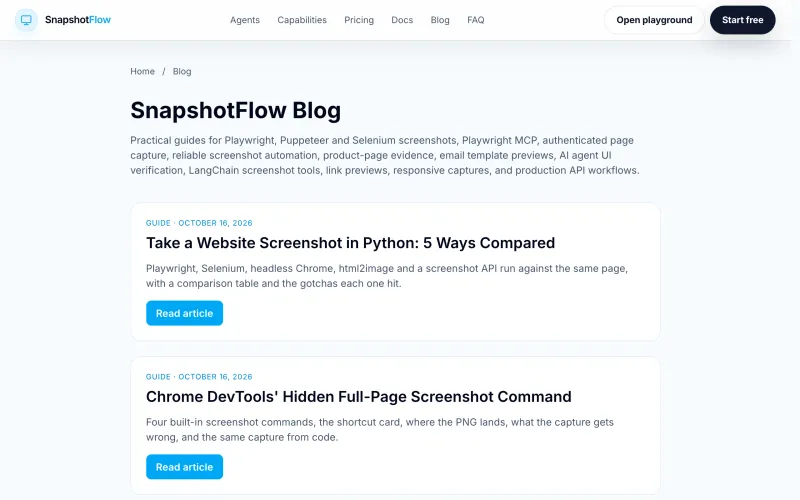
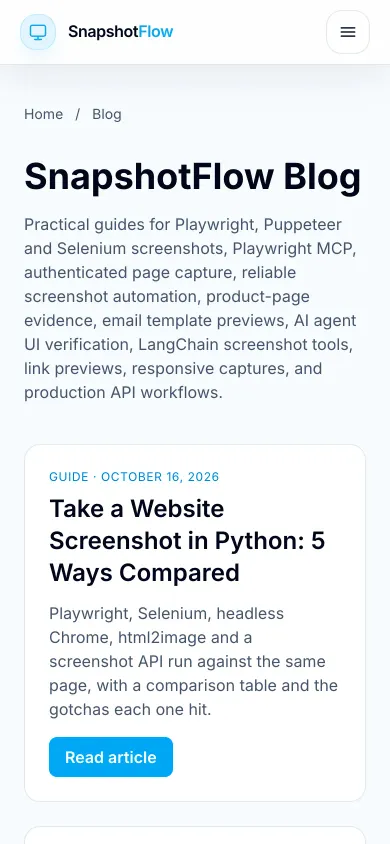
Smaller files for the same picture
mShots returns JPEG. We captured the same 1280×800 page in both formats at quality 80:
| Format | File size | Difference |
|---|---|---|
| JPEG | 88 KB | |
| WebP | 52 KB | about 41% smaller |
One page, one run, so treat it as an example rather than a benchmark. On a page with dozens of previews the difference adds up. To get the card above, add 'device_scale_factor' => 2 and 'image_width' => 800 to the arguments in the WordPress function below.
What mShots is
mShots generates the site previews used across WordPress.com. Developers discovered that the endpoint also works on its own:
The request above returned a JPEG when we tried it in October 2026. Everything else people know about mShots comes from third-party blog posts and plugin pages, not from an official reference. Below we summarize those reports in our own words; treat them as observed behavior that can change.
Known limits (from third-party sources)
| Topic | What is reported |
|---|---|
| Options | w and h for output size; no format, wait, full-page or device options documented |
| Size | Third-party write-ups report a maximum output size |
| First request | May return a "generating preview" placeholder until the image is ready |
| Caching | Images are cached; one plugin page mentions about 24 hours |
| Terms | No official terms found; a WordPress plugin that uses it describes it as free for non-commercial use |
| Support | No public support channel for outside use |
Side by side
| mShots | SnapshotFlow | |
|---|---|---|
| Documentation and terms | None official found | Public API reference |
| Full page | No | full_page=true |
| Viewport and devices | Not documented | width, height, viewport_mobile, device_scale_factor |
| Formats | JPEG | PNG, JPEG, WebP, PDF |
| Waiting for content | Not documented | wait_until, wait_for_selector, delay |
| Cookie banners and ads | Not documented | block_cookie_banners, block_ads |
| Key needed | No | Yes, keep it on the server |
| Cost | Free | 300 free screenshots per new account, then paid |
If you run a personal or non-commercial WordPress site and only need small previews, mShots may be all you need. The moment previews matter to your business, documented terms and options are worth more than a free endpoint.
Replacing mShots on a WordPress site? Check one of your links in the playground before you change any code.
Try it in the playgroundWhy WordPress sites switch from mShots
format=webp and device_scale_factor=2 for small, sharp cards.viewport_mobile=true shows how linked sites look on phones.block_cookie_banners=true keeps consent popups out of your cards.Drop-in WordPress function
This function replaces an mShots URL with a cached file in your uploads folder. The API key stays in wp-config.php (define( 'SNAPSHOTFLOW_API_KEY', '...' );) and never reaches the browser.
The first view of a new URL waits for the capture (a few seconds); later views serve the stored file. If the API is unreachable, the function keeps serving the old file. add_query_arg does not encode values, which is why the target URL goes through rawurlencode. For many links, run the function from WP-Cron instead of during a page view.
Other stacks
Outside WordPress, the same idea is a small proxy route that adds the key and sets cache headers; there is a Node.js version in our thum.io comparison, and a Laravel version in the Laravel screenshot guide. For link previews with titles and images, see the link preview API guide.
Takeaways
- mShots works for small, non-critical previews but has no official docs or terms we could find.
- A documented API adds full page, formats, waits and cleanup options.
- Keep the API key in wp-config.php and cache images in uploads.
WordPress and WordPress.com are trademarks of their respective owners. SnapshotFlow is not affiliated with, endorsed by or sponsored by WordPress.com, Automattic or the WordPress Foundation. Details about mShots come from third-party sources and our own test in October 2026 and may have changed; if you spot an inaccuracy, tell us and we will correct it.
Sources
FAQ
What is WordPress mShots?
mShots is the screenshot service behind WordPress.com that returns an image for a URL such as s0.wp.com/mshots/v1/<encoded URL>?w=800. We could not find official public documentation for it; most usage details come from blog posts and plugins.
Is mShots free for commercial use?
We did not find official terms for the endpoint. The Browser Shots WordPress plugin, which uses it, describes it as free for non-commercial use. For commercial sites, use a service with documented terms.
Why does mShots sometimes show a 'generating preview' image?
According to third-party write-ups, the first request for a URL can return a placeholder while the screenshot is created, and the real image appears after a few seconds on a later request.
How do I replace mShots in WordPress?
Use a small PHP function that fetches the screenshot from an API with your key on the server, stores the file in your uploads folder, and returns its URL. The function in this article does that with a one-day cache.
Screenshots with documented terms and options
Full page, WebP, mobile viewports and cookie-banner blocking from one API, with the key kept on your server. The free tier gives you 300 screenshots, no credit card required.