Run a batch in the background
Add "async": true to a POST /batch request and the API answers right away with 202 and a job id, instead of holding the connection open until every page is done:
{ "jobId": "550e8400-...", "status": "pending", "total": 3 }Poll GET /jobs/:id to follow it. A batch job reports progress as { completed, total } and fills batchResults as pages finish, so you can use the first screenshots before the last one is ready. Each finished page has a downloadUrl or its own error.
- Jobs are now stored durably and kept for about an hour, so a status check no longer depends on which server handled the request.
- Download links are signed again on every status check. If a link has expired, check the job again to get a fresh one.
- Only the account that created a job can read it. Anyone else gets
404. - If a server restarts in the middle of a job, the job ends as
failedwitherrorCode: "JOB_INTERRUPTED"instead of stayingprocessingforever. Submit it again.
More options for batch and diff
POST /batch now accepts block_ads, block_cookie_banners, wait_until and async. With response_type: "image_urls", each result comes back as a signed downloadUrl instead of an inline base64 image, which keeps large batches small.
GET /diff now accepts block_ads, block_cookie_banners and wait_until too. Both captures use the same settings, so an ad that rotates between the two loads no longer shows up as a visual change.
Ads and cookie banners are blocked by default in batch and diff
block_ads and block_cookie_banners now default to true in POST /batch, GET /diff and the MCP batch_screenshot and visual_diff tools. Pages render with fewer overlays and fewer slow ad requests.
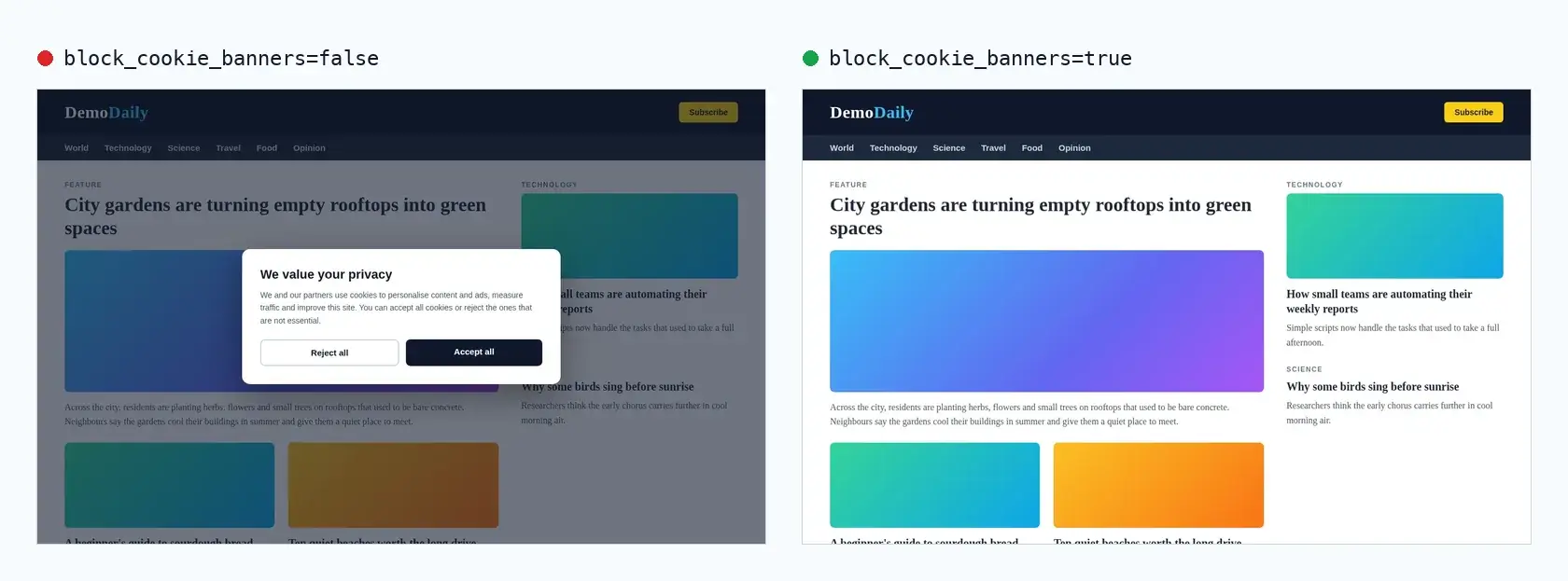
Need the page exactly as a visitor sees it, banners included? Pass false for either option. GET /screenshot and the MCP screenshot tool keep both options off by default.
Faster and more reliable captures on heavy sites
- Bounded network wait. With
wait_until=networkidle2(the default) ornetworkidle0, SnapshotFlow waits for the page's HTML to load, then gives the network up to 6 seconds to settle. Pages that never stop pinging ad and analytics servers no longer use up the whole 30-second timeout. - Fonts and images first. Before the capture, SnapshotFlow waits up to 3 more seconds for web fonts and visible images, so screenshots show fewer fallback fonts and half-loaded pictures.
- Text extraction on heavy pages.
extract_textblocks ads, skips images, fonts and stylesheets, and returns the content once the page HTML is in, even if the page never finishes loading. - Automatic retry. If the browser fails while capturing, SnapshotFlow retries on a fresh browser before reporting an error. If the retry also fails, the API returns
502 CAPTURE_FAILED. - More capacity. Each browser now runs several isolated tabs in parallel, so busy periods queue less.
MCP server updates
batch_screenshothas two new options.include_images: falsereturns download links only, which is much smaller when an agent audits many pages and doesn't need to look at them.async: truereturns a job id right away, so long batches don't hit the client's tool timeout.check_jobnow shows batch progress and partial results, and works for jobs started from MCP as well as from the HTTP API.- Sign-in is more reliable in Cursor and ChatGPT. Retrying a sign-in, or signing in for the first time from two clients at once, no longer fails.
GETandDELETErequests to/mcpnow get a clear405 Method Not Allowed, because the endpoint only acceptsPOST.
Get started
No changes to your code are needed. To skip waiting on large batches, add "async": true and poll the job. Every option is listed in the batch API reference, and agent setup is covered in the MCP server guide.