MCP setup guide · Cursor ·
Connect Cursor to SnapshotFlow MCP
Cursor Agent can call SnapshotFlow while it edits your code: capture the page you are working on, diff two environments, or read documentation as Markdown. SnapshotFlow is a hosted remote server, so there is nothing to install.
Before you start
- A SnapshotFlow account. Sign up free if you do not have one.
- The server URL:
https://api.snapshotflow.com/mcp - No API key. The server uses OAuth, so Cursor signs you in through the browser.
Add the server
Cursor reads MCP servers from mcp.json. Create or edit the file in one of two places:
.cursor/mcp.jsonin the project, for this project only. Commit it to share with your team.~/.cursor/mcp.jsonin your home directory, for all projects.
{
  "mcpServers": {
    "snapshotflow": {
      "url": "https://api.snapshotflow.com/mcp"
    }
  }
}
No API key or headers are needed: the server uses OAuth. Restart Cursor if the server does not appear after saving.
Or ask Cursor to do it
Paste this into Cursor chat and review the change before accepting it:
Add the SnapshotFlow MCP server to this project. Create or update .cursor/mcp.json with:

{
  "mcpServers": {
    "snapshotflow": {
      "url": "https://api.snapshotflow.com/mcp"
    }
  }
}

Then tell me how to sign in and enable it.
Sign in and enable it
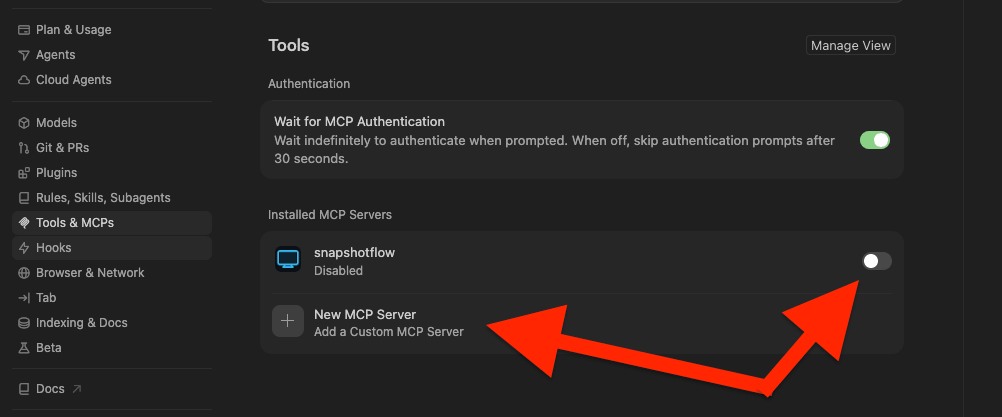
- Open the Customize page from the sidebar (in older versions: Cursor Settings → Tools & MCP).
- Find snapshotflow and start the connection. Cursor opens the SnapshotFlow sign-in in your browser.
- After you sign in, turn the server's toggle on.
Check that it works
Open an Agent conversation and ask:
Which SnapshotFlow tools can you use? Take a screenshot of https://example.com to test the connection.The agent should list screenshot, batch_screenshot, visual_diff, extract_text, and check_job, then return an image and a download link.
Prompts to try in Cursor
SnapshotFlow renders pages on its own servers, so use a deployed or preview URL rather than localhost.
Take full-page screenshots of https://preview.example.com at 1440 and 390 pixels wide. Compare them with the CSS in this project and fix anything that breaks on mobile.Use SnapshotFlow visual_diff to compare https://staging.example.com/pricing with https://example.com/pricing and explain the visual changes.Read https://docs.example.com/changelog with SnapshotFlow extract_text and list the breaking changes that affect this codebase.Troubleshooting
- See connection errors. Open the Output panel (
Cmd+Shift+UorCtrl+Shift+U) and select MCP Logs. - Two configs with one name. A project
.cursor/mcp.jsonentry calledsnapshotflowoverrides the global one. Keep a single entry. - Sign-in expired. Turn the server off and on in Customize and complete the sign-in again.
- The agent does not call the tool. Check that the server toggle is on, then mention SnapshotFlow by name in the prompt.
What it costs
Your AI client spends its own model tokens, billed by your AI provider. SnapshotFlow only counts screenshots against your account:
| Tool | Counts as |
|---|---|
screenshot | 1 screenshot (repeat requests served from cache are free) |
batch_screenshot | 1 screenshot per captured URL (cache hits are free) |
visual_diff | 2 screenshots |
extract_text | 1 screenshot |
check_job | Free |
New accounts get 300 free screenshots for the lifetime of the account. No credit card required. See pricing for paid plans.
Sources
Steps checked against the official documentation on . Client menus change often; if a label differs, the linked page has the current name.
Other MCP clients
The same server works with any client that supports remote MCP over Streamable HTTP with OAuth. Setup guides:
See SnapshotFlow MCP server for all clients, the tool list, and capture options, or the MCP reference for tool schemas. For more tasks to try, browse the MCP prompt library.