Screenshot API · Official Maven SDK · Updated
Screenshot API for Java
The official snapshotflow-java package on Maven Central is a thin, typed wrapper over the SnapshotFlow HTTP API. No Selenium, no WebDriver, no headless Chrome to install on your servers - your JVM application sends requests and receives PNGs, PDFs, batch results, or diff stats. Same endpoints as cURL, less boilerplate, fully typed.
Requires Java 11+. Works with Maven and Gradle, and from any JVM language (Kotlin, Scala, Groovy). Prefer a different stack? See the Node.js SDK, JavaScript API guide, or cURL guide.
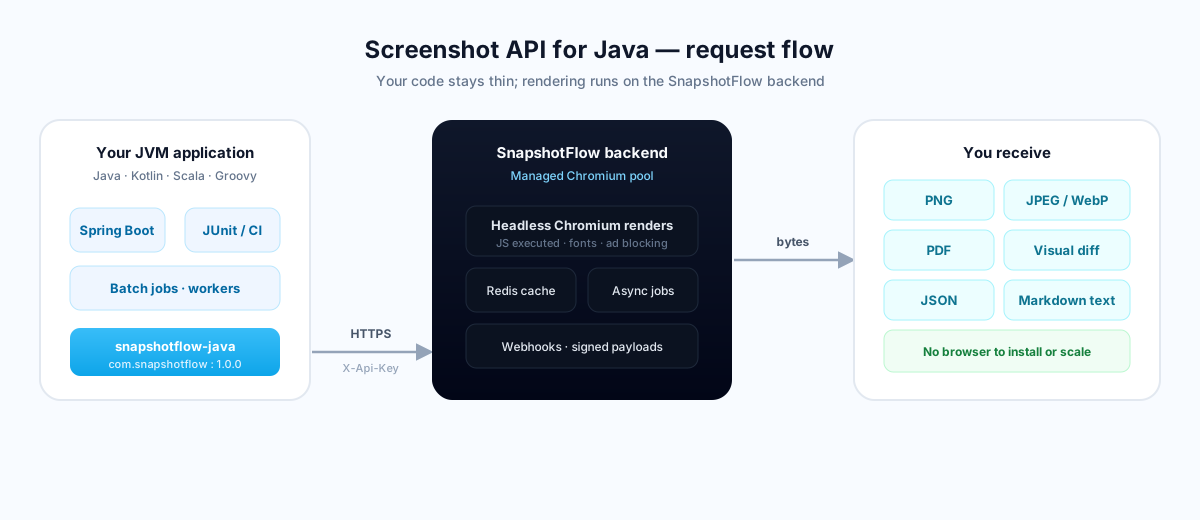
snapshotflow-java to the rendering backend.Why use the SDK instead of raw HTTP?
The API is plain HTTP: one endpoint, one header, query parameters for capture options. The SDK does not hide that model - it makes it pleasant and safe to work with from Java.
- Typed builder, no string-juggling. Build requests with a fluent
TakeOptionsbuilder; the client maps fields to the API's query parameters automatically. - Retries and timeouts built in. Configurable backoff on
429,5xx, and network failures. - Typed exceptions.
QuotaExceededException,RateLimitException,TimeoutException, and the rest map from the API'serrorfield. - One client, every endpoint. Screenshots, batch captures, visual diffs, async jobs, and webhook verification share the same configuration.
A lighter alternative to Selenium and Playwright
The usual way to screenshot a page from Java is to drive a real browser with Selenium WebDriver or Playwright for Java. That means shipping a matching ChromeDriver, keeping the browser binary patched, and giving every worker enough memory to run Chromium. With SnapshotFlow the browser lives on our infrastructure - you add one small JAR and call a method.
| Concern | Selenium / Playwright | snapshotflow-java |
|---|---|---|
| Browser binary | Install & patch ChromeDriver per host | None - runs on the backend |
| Memory per worker | Hundreds of MB for Chromium | A thin HTTP client |
| Full-page, PDF, diff | Manual scripting | One method call each |
| Ad / cookie-banner blocking | Build it yourself | Flags on the request |
| Scaling | Manage a browser pool | Backend handles concurrency |
Install and capture your first screenshot
Add the dependency from Maven Central, set your API key from the dashboard, and run.
Maven — pom.xml
<dependency>
    <groupId>com.snapshotflow</groupId>
    <artifactId>snapshotflow-java</artifactId>
    <version>1.0.0</version>
</dependency>
Gradle — build.gradle
implementation 'com.snapshotflow:snapshotflow-java:1.0.0'
Capture a screenshot
import com.snapshotflow.SnapshotFlow;
import com.snapshotflow.TakeOptions;
import com.snapshotflow.ScreenshotResult;
import java.nio.file.Path;

SnapshotFlow client = SnapshotFlow.builder()
    .apiKey(System.getenv("SNAPSHOTFLOW_API_KEY"))
    .build();

ScreenshotResult shot = client.take(
    TakeOptions.url("https://example.com")
        .fullPage(true)
        .width(1440));

shot.save(Path.of("example.png"));
ScreenshotResult gives you the raw bytes plus save(path), toBase64(), contentType(), and metadata like cached() and etag().
A complete program
package com.example;

import com.snapshotflow.SnapshotFlow;
import com.snapshotflow.TakeOptions;
import com.snapshotflow.ScreenshotResult;
import java.nio.file.Path;

public class App {
    public static void main(String[] args) throws Exception {
        SnapshotFlow client = SnapshotFlow.builder()
            .apiKey(System.getenv("SNAPSHOTFLOW_API_KEY"))
            .build();

        ScreenshotResult shot = client.take(
            TakeOptions.url("https://github.com")
                .fullPage(true)
                .format("png")
                .width(1440)
                .deviceScaleFactor(2)
                .blockCookieBanners(true));

        shot.save(Path.of("github.png"));
        System.out.println("Saved " + shot.contentType() + ", cached=" + shot.cached());
    }
}
Need a URL for an <img> tag? Skip the round trip
// No network call - builds a ready-to-embed screenshot URL.
String imgUrl = client.generateUrl(
    TakeOptions.url("https://example.com").fullPage(true));
// <img src="${imgUrl}">
take() for server-side work (API key sent in the X-Api-Key header). Reserve generateUrl() for cases where embedding the key in a query string is acceptable.
Full method reference
One SnapshotFlow instance exposes every hosted endpoint. Here is the complete surface, followed by a runnable example for each method.
| Method | Returns | Use when you need… |
|---|---|---|
take(options) | ScreenshotResult | A PNG, JPEG, WebP, or PDF as binary data. |
takeJson(options) | ScreenshotJson | Metadata, extracted page text, or a base64 image in one JSON payload. |
takeUrl(options) | String | A hosted download URL instead of streaming bytes yourself. |
generateUrl(options) | String | A screenshot URL with no network call (key in query). |
batch(options) | BatchResult | Up to 10 URLs captured with shared viewport and format settings. |
diff(options) | DiffResult | Pixel-level change stats plus a diff image. |
takeAsync(options) | Job | Start a long-running capture, returns immediately. |
getJob(id) | Job | Look up the status of an async job. |
waitForJob(id) | Job | Poll until the job is done, failed, or times out. |
health() | Health | A service health check (no auth required). |
SnapshotFlow.verifyWebhook(...) | boolean | Signature checks on incoming async webhook payloads. |
take(options) — capture binary
Returns a ScreenshotResult with the raw bytes plus helpers save(path), toBase64(), bytes(), contentType(), cached(), and etag().
ScreenshotResult shot = client.take(
    TakeOptions.url("https://example.com")
        .format("pdf")
        .pdfPrintBackground(true)
        .pdfPaperFormat("a4"));

shot.save(Path.of("example.pdf"));
byte[] raw = shot.bytes();        // hand off to S3, a response body, etc.
takeJson(options) — image plus metadata & text
Ask for metadata and extracted content in one call - handy for indexing, previews, or AI pipelines.
ScreenshotJson res = client.takeJson(
    TakeOptions.url("https://example.com")
        .metadata(true)
        .extractContent(true)
        .contentFormat("markdown")
        .responseType("base64"));

System.out.println(res.metadata().title());
System.out.println(res.content());        // page text as Markdown
String dataUri = res.image();             // data:image/png;base64,...
takeUrl(options) — hosted download URL
Let the backend store the capture and hand you a URL instead of bytes.
String hostedUrl = client.takeUrl(
    TakeOptions.url("https://example.com").fullPage(true));
// Store hostedUrl in your DB, email it, etc.
generateUrl(options) — build a URL, no request
Pure string building, zero latency. Ideal for <img> tags and Open Graph images.
String url = client.generateUrl(
    TakeOptions.url("https://example.com")
        .viewportMobile(true)
        .darkMode(true));
batch(options) — up to 10 URLs at once
Capture many pages with shared settings. Failed URLs are reported per item without failing the rest.
BatchResult batch = client.batch(
    BatchOptions.urls("https://example.com", "https://github.com")
        .format("png")
        .width(1280)
        .responseType("base64"));

for (BatchItem item : batch.results()) {
    if (item.error() != null) {
        System.out.println("Failed: " + item.url() + " - " + item.error());
    } else {
        System.out.println("OK: " + item.url() + " cached=" + item.cached());
    }
}
diff(options) — visual regression in one call
Compare two URLs and get pixel-change stats plus a highlighted diff image.
DiffResult diff = client.diff(
    DiffOptions.between("https://example.com", "https://staging.example.com")
        .threshold(0.1)
        .responseType("base64"));

System.out.println("Changed " + diff.diffPercent() + "% of pixels");
if (diff.hasChanges()) {
    // fail the CI build, alert, or save diff.image()
}
takeAsync(), getJob(), waitForJob() — long jobs & webhooks
Kick off heavy captures without blocking. Poll, or have the result POSTed to your webhook.
// Fire and forget - deliver to a webhook when ready
Job job = client.takeAsync(
    TakeOptions.url("https://example.com")
        .fullPage(true)
        .webhookUrl("https://my-app.com/hooks/snapshotflow"));

// ...or poll until it finishes
Job done = client.waitForJob(job.id());     // blocks until done/failed/timeout
Job status = client.getJob(job.id());       // one-off status check
System.out.println(done.status());          // PENDING -> PROCESSING -> DONE
health() — service check
Lightweight readiness probe, no API key required.
Health h = client.health();
System.out.println(h.status());             // "ok"
SnapshotFlow.verifyWebhook(...) — trust incoming payloads
Static helper. Pass the raw request body and the full signature header; it parses t=...,sha256=..., enforces a freshness window, and compares in constant time.
boolean ok = SnapshotFlow.verifyWebhook(
    rawBody,                                 // raw bytes - do NOT re-serialize
    request.getHeader("X-SnapshotFlow-Signature"),
    webhookSecret);

if (!ok) {
    // reject the request - 400
}
Configure the client
The builder takes one required value, apiKey, and a handful of optional settings. Build the client once and reuse it - it is thread-safe.
SnapshotFlow client = SnapshotFlow.builder()
    .apiKey(System.getenv("SNAPSHOTFLOW_API_KEY"))   // required
    .baseUrl("https://api.snapshotflow.com")         // optional - self-host with Docker
    .timeout(Duration.ofSeconds(60))                 // optional request timeout
    .maxRetries(2)                                   // optional - retries 429/5xx/network
    .defaultHeader("X-Tenant", "acme")               // optional headers on every call
    .httpClient(myHttpClient)                        // optional - inject for tests
    .build();
| Setting | Default | Notes |
|---|---|---|
apiKey | — | Required. Sent as the X-Api-Key header. |
baseUrl | Production API | Point at a self-hosted instance if needed. |
timeout | 60s | Per-request timeout. |
maxRetries | 2 | Backoff on 429, 5xx, and network errors. |
httpClient | Built-in | Inject a custom client for tests or proxies. |
Capture options
Every /screenshot parameter from the API reference is available on the TakeOptions builder. The SDK maps each method to the matching API query parameter, so you stay in typed Java.
| Group | Builder methods |
|---|---|
| Source | url(…), html(…) |
| Viewport | width, height, deviceScaleFactor, viewportMobile |
| Capture | format, quality, fullPage, omitBackground, selector, clip region, imageWidth/Height |
| Timing | delay, waitUntil, waitForSelector |
| Emulation | darkMode, reducedMotion, mediaType, timezone, geolocation*, userAgent |
| Injection | headers, cookies, styles, scripts, hideSelectors, click |
| Blocking | blockAds, blockTrackers, blockCookieBanners, blockRequests |
pdfPrintBackground, pdfLandscape, pdfPaperFormat | |
| Content | extractContent, contentFormat, metadata |
| Async | async, webhookUrl, externalIdentifier, webhookErrors |
| Cache / response | cache, responseType (image · json · base64 · url) |
Builder calls chain in any order, and a plain options object works too. See the full parameter list for ranges and defaults.
Error handling
When a request fails, the SDK throws a typed subclass of SnapshotFlowException that maps to the API's machine-readable error code. Extra fields from the response body (such as quota) are available on the exception details.
| Exception | API code | When |
|---|---|---|
ValidationException | VALIDATION_ERROR | Bad or missing parameters. |
InvalidUrlException | INVALID_URL | Malformed or unsupported URL. |
AuthException | UNAUTHORIZED | Missing or wrong API key. |
BlockedUrlException | BLOCKED | SSRF-blocked target (private IPs). |
TimeoutException | TIMEOUT | Render exceeded the time budget. |
NavigationException | NAVIGATION_FAILED | Page failed to load. |
SelectorNotFoundException | SELECTOR_NOT_FOUND | A required selector never appeared. |
QuotaExceededException | — | Plan quota reached. |
RateLimitException | RATE_LIMITED | Too many requests - back off. |
PoolExhaustedException | POOL_EXHAUSTED | Backend briefly at capacity. |
try {
    ScreenshotResult shot = client.take(TakeOptions.url("https://example.com"));
} catch (RateLimitException e) {
    // back off and retry later
} catch (QuotaExceededException e) {
    System.out.println(e.getDetails());        // e.g. remaining quota
} catch (SnapshotFlowException e) {
    // catch-all for any API error
    log.error("Capture failed: {}", e.getMessage(), e);
}
All exception types and their fields are documented in the repository: github.com/snapshot-flow/java-sdk.
Spring Boot & Kotlin
The same JAR works across the JVM. Register one client bean and inject it wherever you need a capture.
Spring Boot — a reusable bean
@Configuration
public class SnapshotFlowConfig {

    @Bean
    public SnapshotFlow snapshotFlow(
            @Value("${snapshotflow.api-key}") String apiKey) {
        return SnapshotFlow.builder()
            .apiKey(apiKey)
            .maxRetries(3)
            .build();
    }
}

@Service
public class PreviewService {
    private final SnapshotFlow client;

    public PreviewService(SnapshotFlow client) {
        this.client = client;
    }

    public byte[] preview(String url) {
        return client.take(
            TakeOptions.url(url).fullPage(true).blockAds(true)).bytes();
    }
}
Kotlin
val client = SnapshotFlow.builder()
    .apiKey(System.getenv("SNAPSHOTFLOW_API_KEY"))
    .build()

val shot = client.take(
    TakeOptions.url("https://example.com")
        .fullPage(true)
        .darkMode(true))

shot.save(Path.of("example.png"))
What teams build with it
- Dynamic Open Graph images. Generate share cards on the fly with
generateUrl()- no rendering in your own service. - PDF generation. Turn invoices, reports, or dashboards into print-ready PDFs with one
take()call andformat("pdf"). - Visual regression testing. Wire
diff()into JUnit or your CI pipeline and fail builds when a page changes unexpectedly. See visual regression testing. - Change monitoring. Schedule captures and compare over time for website change detection.
- Content & AI pipelines. Use
takeJson()withextractContent(true)to get page text as Markdown alongside the image. - Thumbnails at scale. Capture many URLs with
batch()for galleries, directories, or link previews.
Frequently asked questions
Do I need Chrome or Selenium installed?
No. Rendering happens on the SnapshotFlow backend. Your application only needs the snapshotflow-java JAR and a network connection.
Which Java versions are supported?
Java 11 and later. The same artifact works from Kotlin, Scala, and Groovy.
Does it support full-page screenshots and PDFs?
Yes - set fullPage(true) for full-height captures, or format("pdf") with the PDF options for documents.
Is it thread-safe?
Yes. Build one SnapshotFlow instance and share it across threads and requests.
Can I self-host the backend?
Yes. Run the backend with Docker Compose and point the client at it with baseUrl(…).
Production notes
Store the API key in environment variables or your platform's secret manager - never in source control or client-side code. The client builder accepts optional timeout, maxRetries, a custom HTTP client for tests, and baseUrl if you self-host with Docker Compose.
For async captures with a webhook URL, verify the X-SnapshotFlow-Signature header with SnapshotFlow.verifyWebhook() against the raw request body before you trust the payload.
Thread-safe client, no runtime dependency on a local browser, MIT license. The same JAR works from Java, Kotlin, Scala, and Groovy.